
For cleaning businesses that take bookings on WhatsApp
Stop losing bookings in your WhatsApp chats
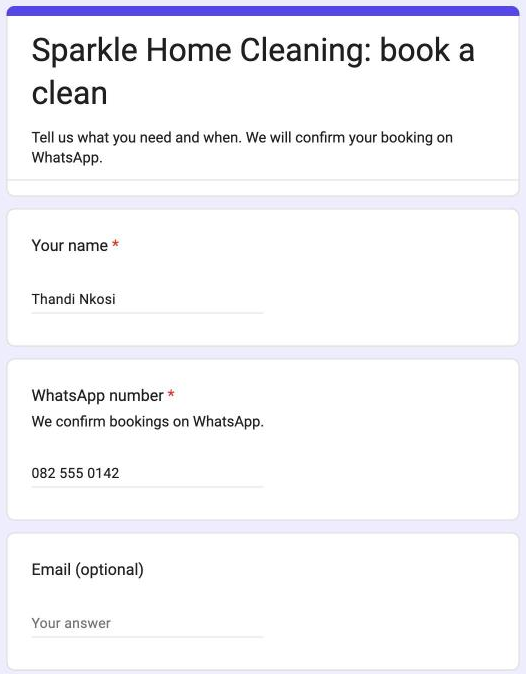
Customers book on a simple form. Every booking lands on one list, in your Google Calendar and in your inbox. The WhatsApp replies are already written, so confirming a clean takes one tap.
- R149 once-off. No monthly fee, no app to install.
- Runs in your own Google account. A free Gmail account works.
- Set up in one sitting with a step-by-step guide, video and checklist.
Sound familiar? A customer asks for Thursday. You scroll back to check who's free. Someone else asks for the same morning. A booking from last week is buried under forty messages, and a cleaner arrives at the wrong address.
The kit gives every booking one home, so nothing depends on you remembering.
See a booking go from customer to cleaner
What happens when a customer books
- 1
They fill in your form
Your services and starting prices, the areas you cover and your start times. On their phone, in a couple of minutes.
- 2
It lands on your Jobs list
With its own booking number, the address and notes. It goes into your Google Calendar, you get an email alert, and the customer gets an email saying you have their request.
- 3
You pick the cleaner
Type their name. If they're already booked at that time, the row is flagged as a clash before you promise anything.
- 4
You tap to send
WhatsApp opens with the confirmation written: date, time, cleaner and price. On the day, one more tap sends your cleaner the address and notes.
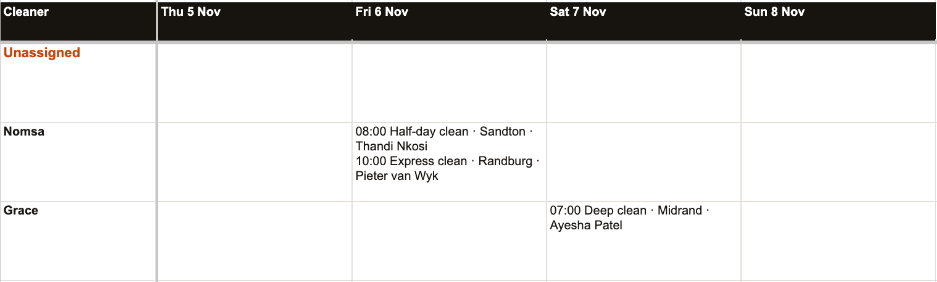
Your whole week, on one screen
These are real screens from a test run, with sample bookings.

What's in the kit
The bookings sheet
Jobs, week view, services, cleaners, areas and messages. You make your own copy: only you can see it.
Your booking form
Built for you from your sheet with one menu click, and updated when your services change.
Six WhatsApp messages
Greeting, confirm, reminder, on the way, review request and job details for your cleaner. Edit them to sound like you.
Setup guide (11 pages)
Every screen you'll see, with real screenshots, including Google's permission steps.
Setup page
A tick-off checklist, your messages filled in with your details, and six AI prompts for your services, prices and bio.
Email help
Stuck on a step? Send us a screenshot and we'll tell you what to do.
It's for you if
- You run a cleaning business with 1 to 15 cleaners.
- Most bookings arrive on WhatsApp, by phone or by word of mouth.
- You or someone on your team can use a Google Sheet.
It's not for you if
- You need customers to pay a deposit online when they book.
- You want messages sent without tapping send. The kit writes them; you press send.
- You'd rather not use Google at all.
Need any of those? That's a custom build. Book a free 20-minute call.
The Cleaning Bookings Kit
R149 once-off
- Bookings sheet and booking form
- Six WhatsApp messages and six AI prompts
- 11-page setup guide, setup page and video
- Email help while you set up
Your links arrive by email as soon as you've paid, and show on screen too. You'll need a Google account and a computer for the setup. After that, your phone is enough.
Questions
Do I need to be good with computers?
If you can fill in a Google Sheet, you can set this up. The guide shows every screen, the setup page has a checklist, and you can email us a screenshot if you get stuck.
Is there a monthly fee?
No. You pay R149 once. The kit runs in your own Google account, and Google Sheets, Forms, Calendar and Gmail are free.
Can I use it on my phone?
Yes, after setup. Customers book on their phones, and you can open the sheet in the Google Sheets app to pick cleaners and tap the WhatsApp buttons. The first setup needs a computer.
Does it send WhatsApp messages by itself?
No. It writes each message with the customer's details filled in and opens WhatsApp for you. You check it and press send. That keeps it free, and it works with your normal WhatsApp or WhatsApp Business.
Where are my customers' details kept?
In your own copy of the sheet, in your Google account. Under Bridges can't see it.
Google says the app isn't verified. Is that safe?
Yes. The automation lives inside your own copy of the sheet, so Google names you as its developer and shows that warning the first time. The guide walks you through it.
Can I change the services, prices and messages?
Yes, all of them. Change your services or areas on the sheet, then click Bookings Kit > Update the form from my lists, and your booking form follows.
How do I get the kit after I pay?
Straight away. Your links show on screen after payment and arrive by email from kits@underbridges.co.za. If you don't see the email, check your spam folder or write to info@underbridges.co.za.