
For programmes, NPOs and summits that take applications
Stop sending acceptance emails one by one
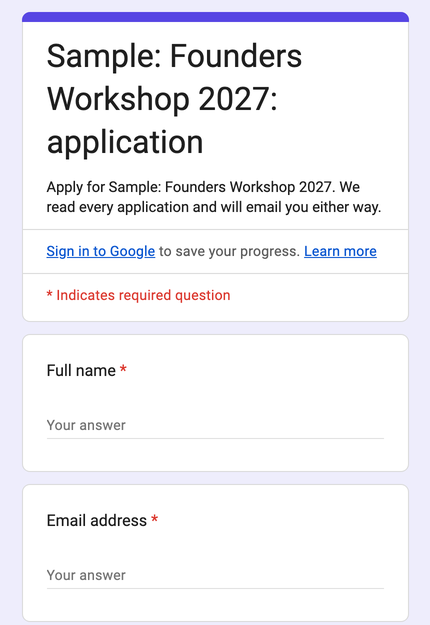
People apply on one form. You accept, waitlist or decline them in two clicks, and the kit sends every email for you: the confirmation, the acceptance with a QR code, and reminders a week and a day before. On the day, your door team checks people in with a phone camera.
- R149 once-off. No monthly fee, no yearly event licence.
- Runs in your own Google account. A free Gmail account works.
- Set up in about 30 minutes with a step-by-step guide.
Sound familiar? Applications come in through a form and by email. Someone copies them into Excel, sorts them by province, and then spends an evening sending hundreds of acceptance emails by hand. On the day, the queue at the door waits while you search a printed list.
The kit does the copying, the emails and the door, so your team can focus on the programme.
From application to the door
- 1
They apply on your form
Your own screening questions: province, business stage, turnover band, why they want to come. Built from a tab in your sheet with one menu click.
- 2
It lands on your Applicants list
With an ID and one column per answer, ready to filter. They get a "we have your application" email straight away.
- 3
You choose who comes
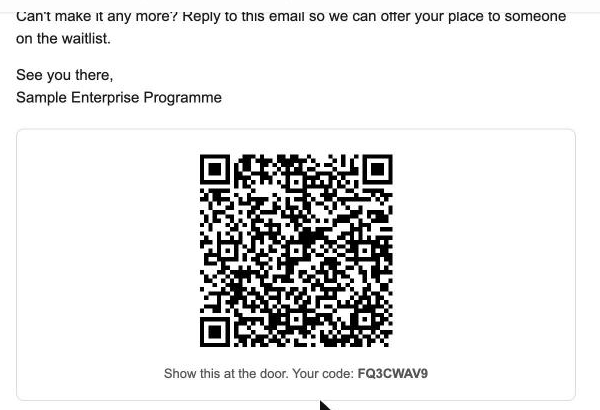
Select the rows and click Accept, Waitlist or Decline. Each person gets the right email, and accepted guests get their QR code. Or let the kit accept everyone until you're full.
- 4
They're reminded and checked in
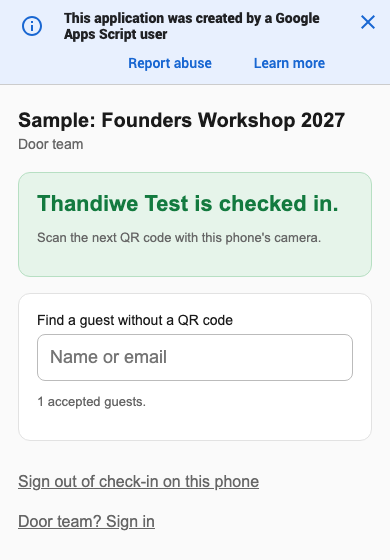
Reminders go a week and a day before. At the door, a phone camera scans the QR code. The day after, a feedback form goes to everyone who came.
Real screens from a test run
Sample applicants, sample event.

Seven emails, written for you
Received, accepted, waitlist, declined, a week before, a day before and feedback. Edit them in the sheet to sound like you.
What's in the kit
The workbook
Settings, Questions, Applicants, Emails and a Check-in list. You make your own copy: only you can see it.
Your application form
Built for you from your questions with one menu click. Change the questions and build it again.
Automatic emails
Sent when you change a status, with the person's name, the date, time and venue filled in.
QR check-in page
For your door team, protected by a PIN. Guests only ever see their own code.
Setup guide (7 pages)
Every step, with real screenshots, including Google's permission screens and the check-in setup.
Email help
Stuck on a step? Send us a screenshot and we'll tell you what to do.
It's for you if
- You run application-based or free events, programmes or summits for 50 to 1,000 people.
- You choose who gets a place, or give places first come, first served.
- Someone on your team can use a Google Sheet.
It's not for you if
- You sell tickets. This kit doesn't take payments.
- You need to email more than about 1,500 people a day (Google's limit on Workspace; about 100 a day on free Gmail, and the kit sends the rest the next morning).
- You'd rather not use Google at all.
Need a branded registration platform with your own login, payments or live reports? That's a custom build. Book a free 20-minute call.
The Event Applications Kit
R149 once-off
- Workbook, application form and seven emails
- QR check-in page for your door team
- Reminders and a feedback form, sent for you
- 7-page setup guide and email help
Your links arrive by email as soon as you've paid, and show on screen too. You'll need a Google account and a computer for the setup.
Questions
Do I need to be good with computers?
If you can fill in a Google Sheet, you can set this up. The guide shows every step with screenshots, and you can email us a screenshot if you get stuck.
Is there a monthly or yearly fee?
No. You pay R149 once and use it for as many events as you like. It runs in your own Google account, and Google Sheets, Forms and Gmail are free.
How many people can it handle?
The sheet handles thousands of applications. The limit is Google's daily email allowance: about 100 recipients a day on a free Gmail account and about 1,500 on Google Workspace. If you accept more in one day, the kit sends the rest the next morning by itself.
How does check-in work?
You publish a small check-in page from your copy of the sheet (the guide shows how, in four steps). Your door team opens it once and types a PIN. Then they scan each guest's QR code with the phone's normal camera. Guests without a phone are found by name.
Can we run the same event in several cities?
Yes, with the Series and Sponsor Pack, offered after you buy. Applicants choose their city or date, every email uses that session's details, capacity counts per session, and a sponsor report fills itself in.
Where are applicants' details kept?
In your own copy of the sheet, in your Google account. Under Bridges can't see it. The QR codes are made from a check-in code only; no names or emails leave your account for them.
Google says the app isn't verified. Is that safe?
Yes. The automation lives inside your own copy of the sheet, so Google names you as its developer and shows that warning the first time. The guide walks you through it.
How do I get the kit after I pay?
Straight away. Your links show on screen after payment and arrive by email from kits@underbridges.co.za. If you don't see the email, check your spam folder or write to info@underbridges.co.za.